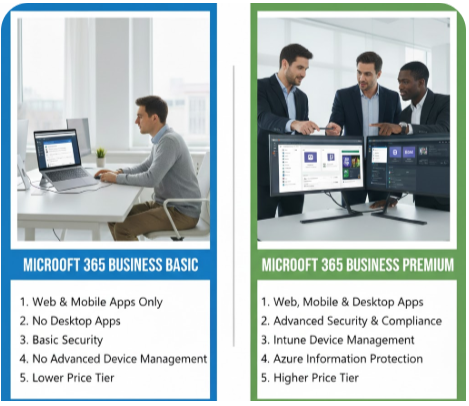
Choosing the right productivity suite is a major decision for any business that wants to grow safely and efficiently. As teams expand, they quickly realize they need more than just a place to type documents; they need a way to protect their data and manage a fleet of devices. When you go to buy Microsoft 365 Business Premium or Basic at the best price, the choice often comes down to Microsoft 365 Business Basic or Business Premium. While both give you a professional start, the gap between them is huge; it’s essentially the difference between having a standard office and having a fortified, high-tech headquarters.
Understanding these technical differences is much easier when you have a genuine distributor to explain the details. Wroffy Technologies acts as a helpful partner in this journey, making sure that when you purchase your software, it actually fits your long-term goals and keeps your data safe.
Key Functional Gaps You Need to Know
Desktop App Access: This is the most obvious difference. Business Basic is a “web-only” plan, meaning your team has to use Word, Excel, and PowerPoint inside an internet browser. This is fine for quick changes, but for anyone doing heavy data work, it can feel slow and limited. Business Premium, on the other hand, lets you install the full versions of these apps on up to five PCs or Macs per person. This allows your team to work faster, use more advanced tools at the best price, and even get work done offline when the Wi-Fi is down.
Advanced Threat Protection: The true difference is seen in how each approach deals with security. While the Basic package provides conventional protection, the Business Premium is designed to prevent advanced hackers. It includes Microsoft Defender, which checks your emails for harmful links and detects advanced phishing attempts before they reach an employee’s inbox. To avoid the nightmare of a data breach and ensure you get the best price for total protection, every company that handles confidential customer information must have this level of security.
Mobile Device Management: As more people work from home or on the go, keeping track of company laptops and phones becomes a challenge. Business Premium includes a tool called Microsoft Intune. This allows your IT person to manage devices remotely, wipe data if a laptop is stolen, and make sure everyone is using the latest security patches. You simply don’t get this kind of control when you buy Microsoft 365 Business Basic.
Understanding the Microsoft 365 Options
Before you make a final decision to buy Microsoft 365 Business Basic or Business Premium, it’s helpful to see how these two versions are built for different stages of a business. Both have their place depending on what you need right now:
Microsoft 365 Business Basic: This is a great “online-only” choice for startups or small teams that mostly need a professional email and a way to chat and store files in the cloud.
- Includes a 50GB professional email mailbox and custom domain support.
- Provides 1TB of OneDrive storage and Microsoft Teams for video calls and collaboration.
Microsoft 365 Business Premium: This is the ultimate plan for established businesses that need the full power of desktop apps combined with elite security to protect against modern cyber threats.
- Features the fully installed desktop Office suite and advanced device management through Intune.
- As a Microsoft 365 authorized partner, we highly recommend this for its included Azure Information Protection and advanced threat defense.
| Feature | Microsoft 365 Business Basic | Microsoft 365 Business Premium |
| App Access | Web/Mobile Only: Browser-based access only. | Full Desktop Suite: Install on up to 5 PCs/Macs per user. |
| Offline Work | No: Requires constant internet connection. | Yes: Work offline; syncs when reconnected. |
| Device Management | None: No central control over company devices. | Microsoft Intune: Remotely manage and wipe devices. |
| Email Security | Standard: Basic spam and malware filtering. | Advanced: Defender for O365 (Safe Links/Attachments). |
| Cyber Protection | Basic: Standard cloud protection. | Enterprise-Grade: Defender for Business (EDR/Antivirus). |
| Identity Control | Basic: Standard Multi-Factor Authentication. | Conditional Access: Risk-based login rules (Entra ID P1). |
| Data Protection | Standard: Basic encryption. | DLP & AIP: Prevent data leaks and tag sensitive files. |
High-Level Security and Data Control
In an era where cybercrime is a real threat, the “Premium” label isn’t just a fancy name—it’s about resilience. When you buy a Business Premium license, you gain access to “Conditional Access.” This lets you set smart rules for who can see your data. For example, you can require an extra security code only when someone logs in from outside the office. This ensures that even if a password is stolen, your company files stay locked away from the wrong people.
Furthermore, Business Premium makes it easy to protect your most sensitive documents. You can “tag” files—like your financial records or client lists—so they can’t be copied, printed, or sent to anyone outside the company. This is a huge help for businesses in fields like law or finance that have to follow strict privacy laws. Instead of having to purchase several different security apps, you get everything you need in one place.
Since security is the most important part of your digital setup, working with a Microsoft 365 antivirus authorized partner is a smart move. We help you set up these advanced features so your team can work together without accidentally leaving the door open to digital risks.
Conclusion
Moving from Business Basic to Business Premium is a big step in a company’s growth. While decision to buy Microsoft 365 Business Basic provides a cost-effective way to get started online, the Premium plan provides the professional-grade security and device control that a modern, scaling business needs to stay safe. It bridges the gap between just getting work done and doing work securely.
Picking the right plan is about knowing your risks and your goals. As an authorized reseller, Wroffy Technologies is here to provide licensing help and technical support to make your move easy while securing the best price. We make sure your investment in Microsoft 365 is set up for high performance and total security, so you can focus on running your business with peace of mind.
Be the first to comment on "Top Key Differences: Microsoft 365 Business Basic vs Business Premium"